文章目录
- 安装命令一
- 安装命令二
- 安装命令三
- 使用
插件 zsh-autosuggestion 用于命令建议和补全。
GitHub主页:https://github.com/zsh-users/zsh-autosuggestions
安装命令一
cd ~/.oh-my-zsh/custom/plugins/
git clone https://github.com/zsh-users/zsh-autosuggestions
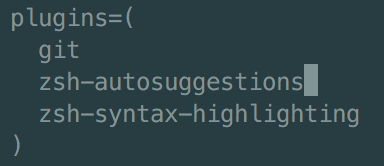
接着编辑隐藏文件 ~/.zshrc,找到 plugins=():
vi ~/.zshrc
找到 plugins,加上 zsh-autosuggestions 这个插件:
安装命令二
git clone https://github.com/zsh-users/zsh-autosuggestions ${ZSH_CUSTOM:-~/.oh-my-zsh/custom}/plugins/zsh-autosuggestions
安装命令三
brew install zsh-autosuggestions
最终的效果:

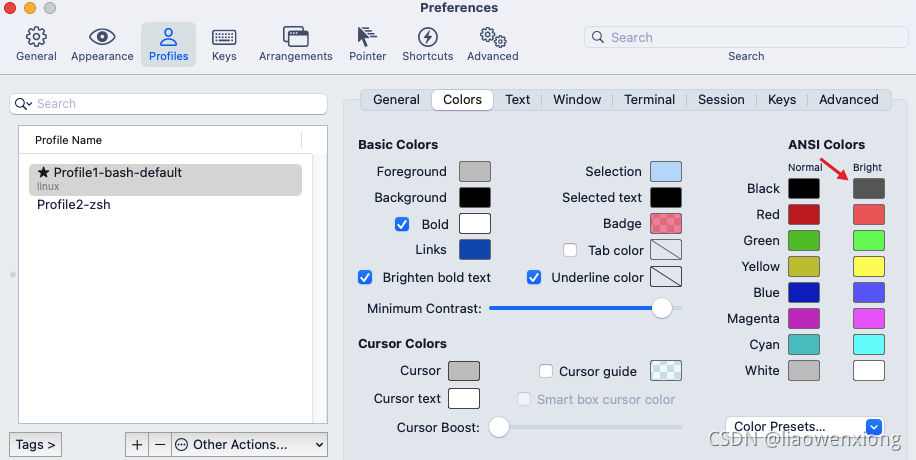
如果补全命令的字体不太清晰,与背景颜色太过相近,可以自己调整一下字体颜色。
Preferences -> Profiles -> Colors 中的 Foreground 是标准字体颜色,ANSI Colors 中 Bright 的第一个是补全的字体颜色,如下所示:
使用
如果提示的是你要的那句命令,按右箭头(→ )就可以补全命令了。


)

详解)


![arrays.sort(._Arrays.hashCode(Object [])与Objects.hash(Object…)](http://pic.xiahunao.cn/arrays.sort(._Arrays.hashCode(Object [])与Objects.hash(Object…))


和${}的区别)


